MacBook Pro Power-On Pads – Location and Use
If your MacBook Pro won’t power on, there’s an easy way to determine if the power button is to blame. This procedure takes only minutes, in the end, you’ll either have diagnosed the issue in only a few minute’s time or you’ll have quickly ruled out one of the common issues that prevent a MacBook Pro from turning on.
My Unibody MacBook Pro doesn’t turn on
Apple was generous enough to design an integrated method for bypassing the power button on all MacBook logic boards. Below I’ll show you how to use the power pads, as well as provide high-res reference photos of the locations of the power pads for each release of the MacBook Pro Unibody laptops.
We’ve talked about this before on the Beetstech Blog. If you’re looking for info on MacBook Air models follow this link.
Why use power-on pads?
There are countless reasons why your MacBook Pro might not turn on, and this procedure only rules out a single, but very common root cause. The power button is connected to the logic board via the same 30-pin or 40-pin cable as the rest of the keyboard, and of those pins, only two are necessary for the signal to travel from the power button to the logic board. There are probably quite a few ways you could damage this connection if you were creative enough, but we typically find either corrosion from a liquid spill damaged the keyboard connector on the logic board, or the keyboard flex cable was damaged from repeatedly attempting (and failing) to insert the cable.
Diagnosing hardware issues is a simple process of elimination, and to make the most efficient use of your time, you should first target the possibilities that give you the best bang for your buck. If there’s a component that fails more frequently than others or if the computer’s layout provides quick, easy access to a component, you should prioritize eliminating those possibilities first. The power button ticks both of those boxes for us and ruling it out early could very well get you your diagnosis in a matter of minutes. But if you still can’t power on the computer after bypassing the power button, you won’t have spent much time or effort and your list of possibilities will have shrunk by one.
How do I use the power pads?
Tools Needed
- The proper screwdriver to remove bottom case screws for your particular model.
- A paperclip with electrical tape on the area you will hold (to act as an insulator) or a flat head screwdriver.
Steps
- Remove the bottom case.
- Don’t forget to protect your computer from ESD discharge by grounding yourself ahead of time.
- Disconnect the power adapter and battery. Connecting/disconnecting other cables while power is connected can cause damage.
- Disconnect the keyboard cable from your logic board. This step is very important! If you leave the keyboard plugged into the logic board, the power pads won’t work.
- Now that the keyboard cable is disconnected, plug the battery in again.
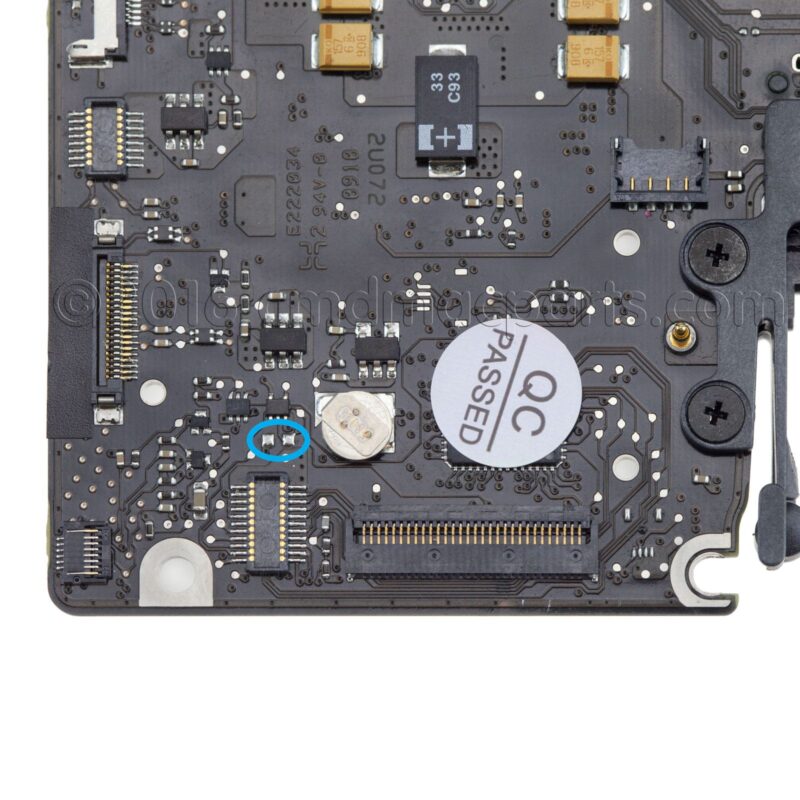
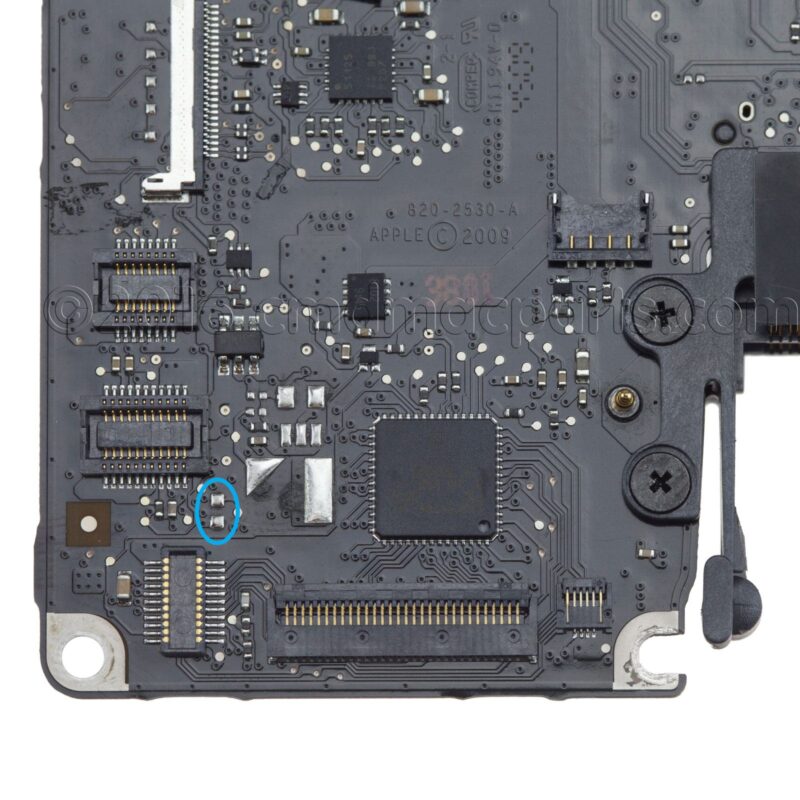
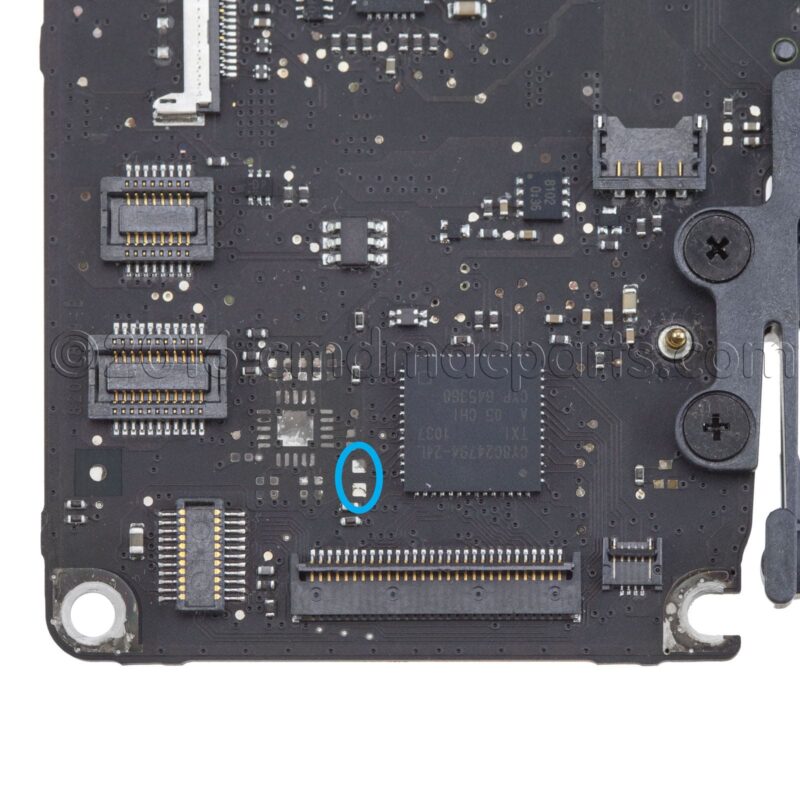
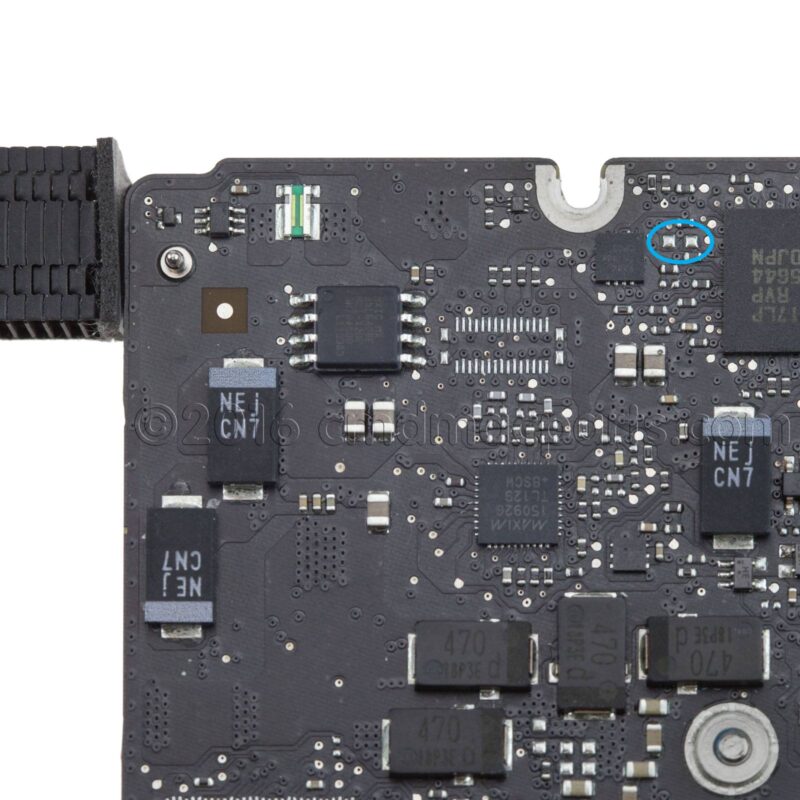
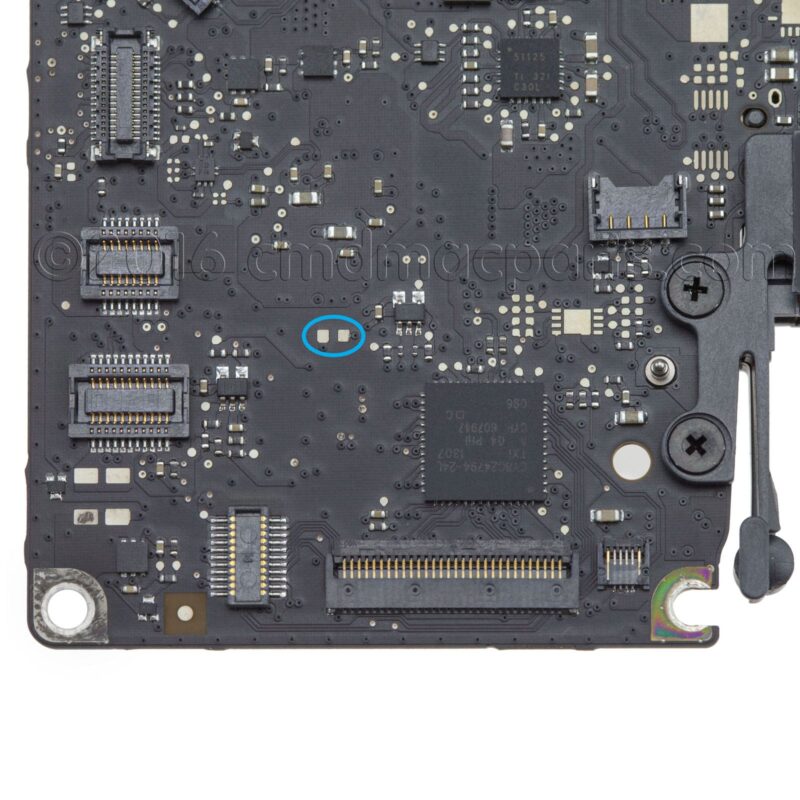
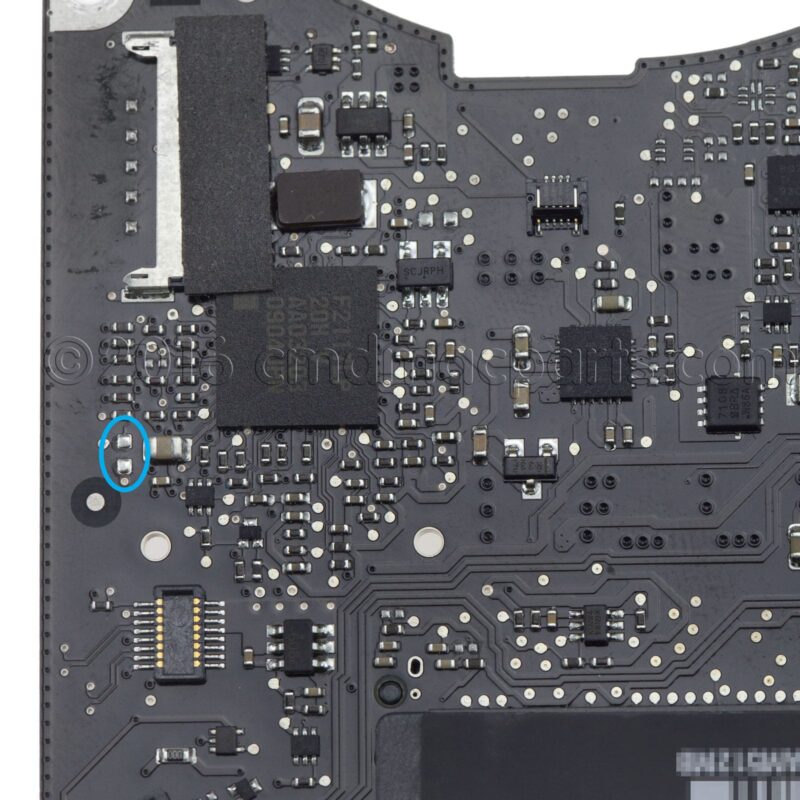
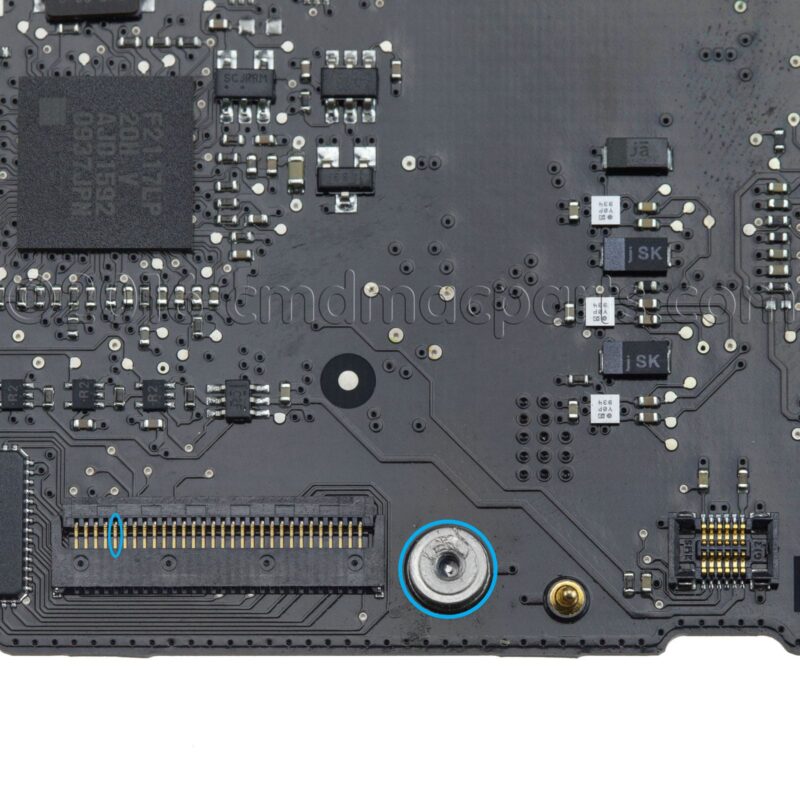
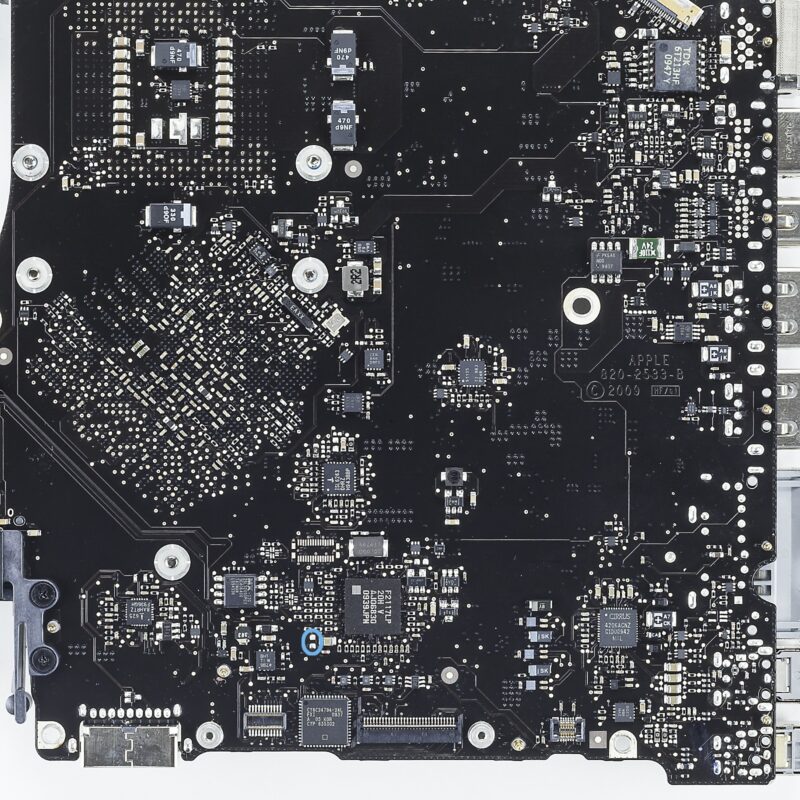
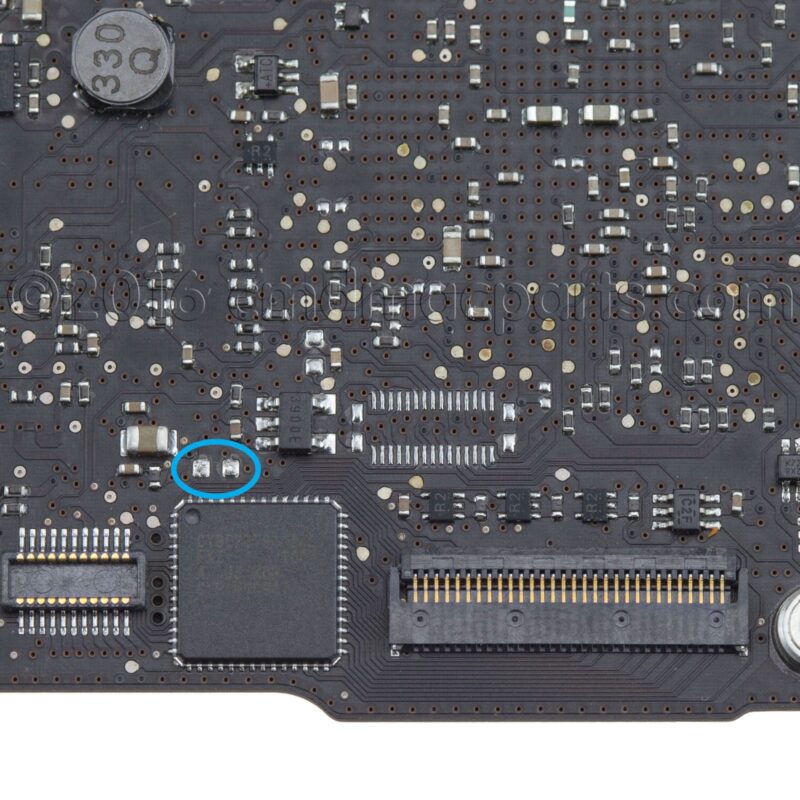
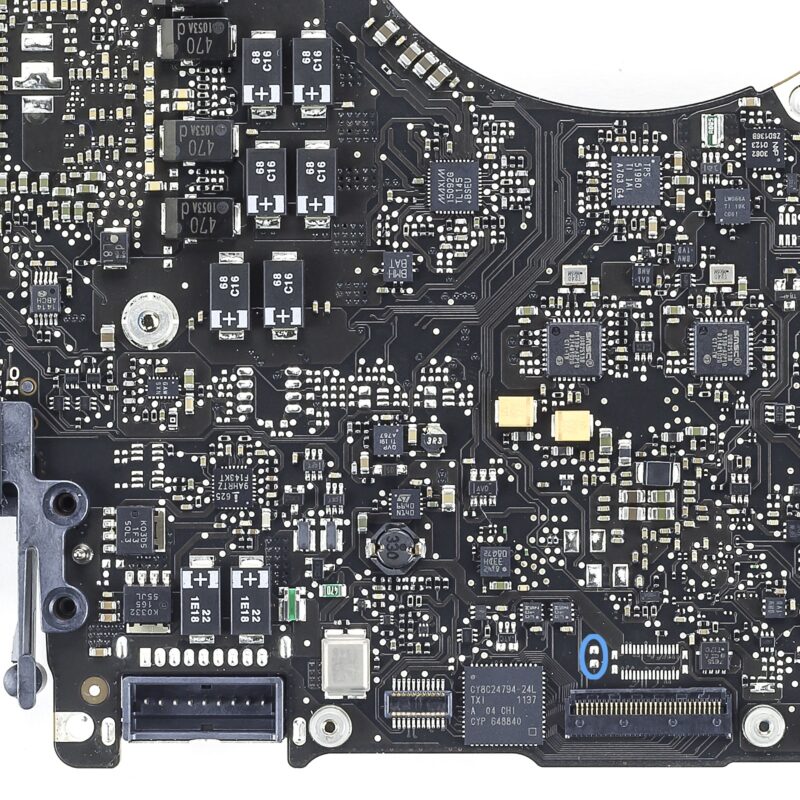
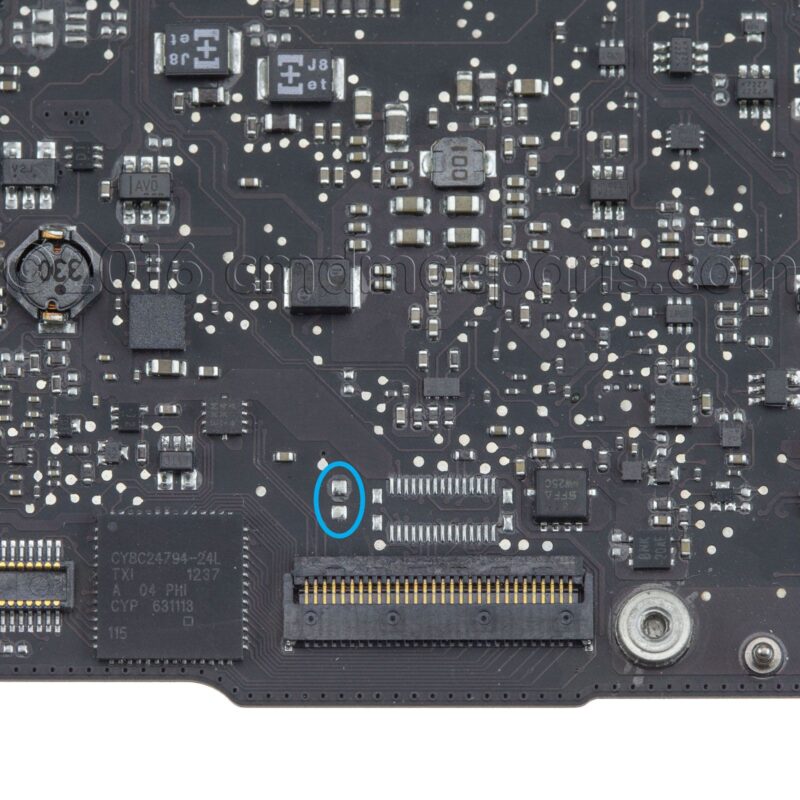
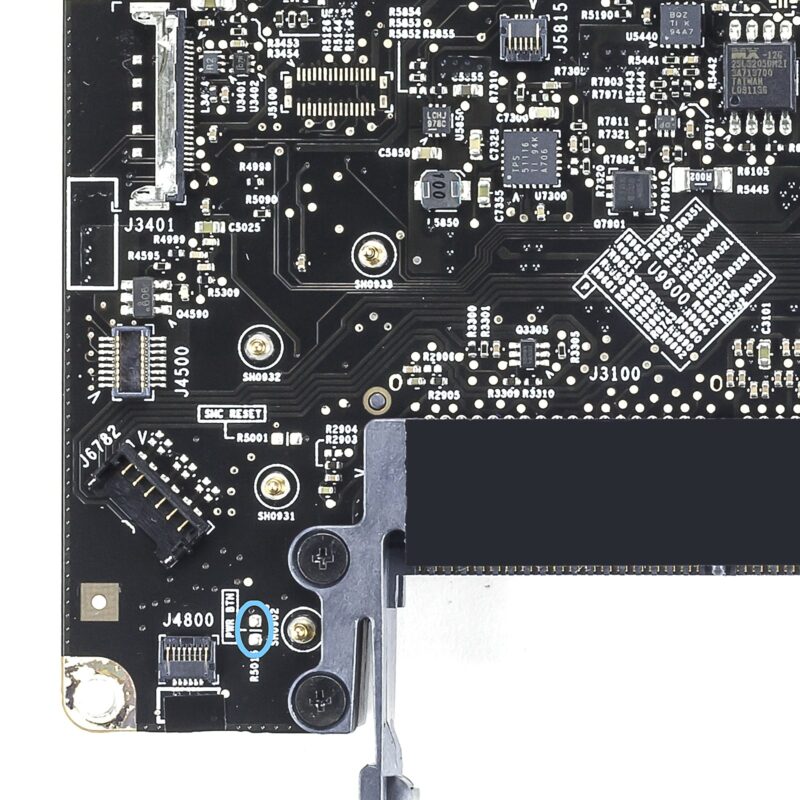
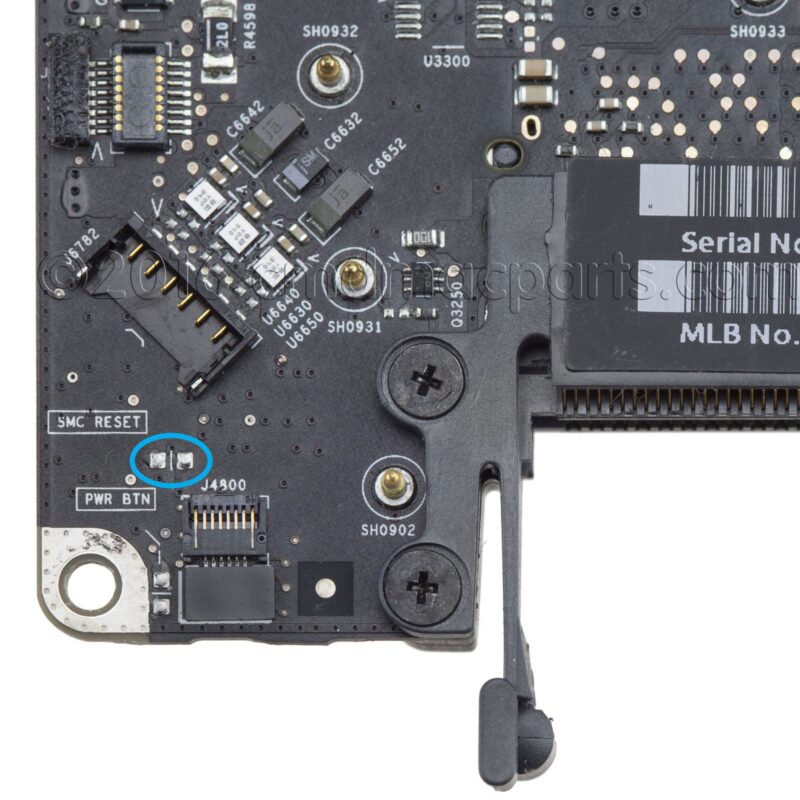
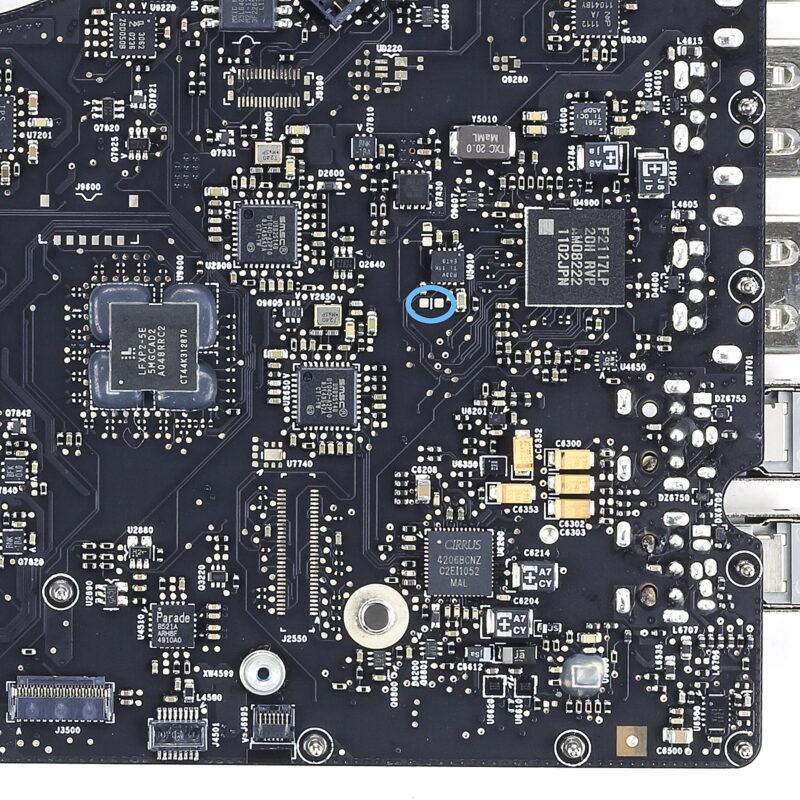
- Locate the power-on pads using the reference pictures below.
- Use the paper clip or flat head screwdriver to bridge the connection with the 2 power-on pads. Maintain the bridge for a maximum of three seconds.
- If the fan doesn’t start spinning after 10 seconds, then reattempt the bridge between the power-on pads.
MacBook Pro 13" Unibody (Model A1278)
MacBook Pro 15" Unibody (Model A1286)
- Late 2008 / Early 2009
- Mid 2009
- Mid 2009 (2.53GHz CPU w/ single fan)
- Mid 2010
- Early 2011 / Late 2011
- Mid 2012
MacBook Pro 17" Unibody (Model A1297)
Like this post
About the author

19 comments
Leave a comment
Recommended posts
High Sierra and Testing RAM
With macOS 10.13, otherwise known as High Sierra, Apple introduced an ambitious EFI update. Several of the changes include: the introduction of the Apple File System, support for NVMe drives, and the usual batch of security updates. However, these EFI updates can cause some unwanted behavior when you test your Apple computer’s memory. At Beetstech, we use a long-time industry standard, MemTest86 to perform a comprehensive test of each computer’s RAM.
But never the type to blindly accept test results, strange testing outcomes led us to discover a bug in MemTest86 affecting computers running the new EFI firmware. In short, the newly updated EFI causes MemTest86 to incorrectly fail certain tests. But there is good news: while normal operation of MemTest86 is limited under these new EFI updates, we also discovered some simple workarounds for testing your Apple’s memory in MemTest86.
So let’s dive into how we discovered the MemTest bug, devised a reliable work-around, and get into some nitty gritty details of MemTest86 operation.
MacBook Air Power-On Pads – Location & Use
They go by “jumper pads”, “short-circuit pads”, “power pads”, and “power-on pads”. Whatever you call them, there are two bits of metal on your MacBook logic board that can force your laptop to boot up, even if the power button won’t do the trick.
OEM MagSafe Chargers vs Cheap Imposters: Teardown for Truth
Anywhere premium products are produced, there are unsavory folks trying to make a quick buck selling cheap knockoffs. It happens in every industry, from clothes to food to tech. But in recent years, counterfeit electronics have surpassed nearly all other categories of counterfeit goods by dollar value, and Apple, being the de facto high-end electronics manufacturer, makes for a prime target.
But you’d never be caught buying counterfeit electronics, because you can tell the difference, can’t you?
The Ultimate Guide to Apple’s Proprietary SSDs
Remember the good ol’ days of carrying a spare battery, upgrading your own RAM, maybe even adding a second hard drive? If you’re an Apple user, those luxuries may be behind us, but upgrading your own solid state drive is still a privilege the Apple overlords allow us to have, for now that is.
Despite retaining the ability to upgrade your own SSD, ever since Apple introduced their proprietary “blade” SSDs in 2010, the task hasn’t been as simple as it once was. Apple talks up read and write speeds, but they rarely dive into the nitty gritty details of the technology behind the SSDs they use — drives specially designed only for Apple computers.
After countless questions, both from customers and our own staff, we decided to start our own investigation into the hardware involved. You have to be a bit of a private eye to uncover the secrets behind these drives, and the deeper we looked, the more surprises we found.
Your Hard Drive Cable Is A Ticking Time Bomb
Owners of a Unibody MacBook Pro laptop are probably already aware that failure of the hard drive flex cable is a common issue. While it affects just about the entire Unibody lineup, the Mid 2012 MacBook Pro 13″ (Model A1278) is especially prone to this type of failure.
What is it that makes the Mid 2012 release special in this regard? A design flaw in the flex cable that seems to be compounded by the properties of the aluminum housing.
Our repair services department noticed this issue when they’d replace a bad cable, only to have the customer return a few months later with another bad cable. And possibly again with yet another bad cable. It didn’t matter if we used a used cable or a new cable in the replacement. Customers kept returning with the same persistent issue. We had to figure out what was causing the issue and find a solution.
When will you have the other 17 inch power pads up?
Aaron, we are working to get the rest of the 17″ and 15″ power pads posted within the next few weeks.
Check back soon!
Awesome!
What about the mba locations?
MacBook Air locations are up!
Link to MacBook Air power-pads post.
What damage could be done to my MacBook if I didn’t unplug everything before I tried the power pads? I was able to turn on my computer several times with the power pads. But now, there is no evidence of power to the MacBook, at all.
It’s possible that you could have caused a short circuit on the board and damaged a component.
But in order to attempt using the power on pads, the only cable you need to remove is the keyboard flex cable, and the keyboard cable doesn’t pose much/any risk to unplug while there’s power to the board. Our mention of that in the instructions is kind of overkill.
While there’s power to the board, it’s possible that you accidentally caused a short circuit somewhere on the board and damaged some component on the board as a result. An exposed logic board has lots of metal surfaces that are easily short circuited by something like the piece of metal you’re using to short circuit the power on pads.
Another possibility is just that the board was already on its way out due to a liquid spill, which is generally the reason people are attempting to power their computer on with the power on pads in the first place. Liquid spills can cause all sorts of finicky problems, leaving the board in a state where will power on or not depending on its mood.
Or the board could still have had some liquid on it, which caused a short during the time power was supplied to the board and you were testing the power on pads. Liquid gets stuck in lots of little crevices on the board, between components, and sometimes it takes a surprisingly long time for all the areas to dry out. In our repair facility, we use a toaster oven to expedite the board drying.
If you’re board still isn’t powering on, send a message to our repair techs and they can help you out.
https://beetstech.com/mail-in-repair
Hello everyone. I want to use the logic board of my macbook late 2008 for a desktop htpc. The problem is the power button.
I think should be possible solder the power pads to the cables of an ATX power button… but I don’t know (I don’t know nothing about electronics :S ) Any idea?
This solution should work. Although if your going to go through the trouble of soldering on a new power button, replacing the keyboard may be an easier option. Let me know if you have any more questions, thanks!
Thanks for the fast reply 🙂
The goal of my project is put the logic board in a handcrafted case and use it as a desktop mini computer plugged to TV. This is the reason I need a new power button and no need to replace the keyboard.
Yesterday I welded each power pad to an ATX power button cable. It works, now I can turn on the laptop with that power button 🙂 I will go on with my project: transform the MacBook into a tiny htpc 🙂
Where can you go to purchase wiring diagrams for macbook pro mid 2010 15 in ?
laptop-schematics.com
I have been directed to this page from Apple community support forum regarding
a replacement keyboard for a mid 2009 Macbook Pro 15″ 2.53 Ghz.
I can use and external keyboard but I cannot try to correct the keyboard issue
by resetting the nvram (pram) or smc. So I was advised to try to disconnect
the internal keyboard and try the external keyboard. But with the internal
keyboard disconnected the power button won’t power on the machine.
So how would I use the instruction here to be able to reset the pram with
external keyboard? The original keyboard for this machine was trashed by
a small water spill. within a few months after I bought it new in late 2009.
I have been using an external keyboard since, until recently I saw a keyboard
available from parts supplier (eye)Fixit. This replacement keyboard is
malfunctioning.
awesome! It worked. Late 2008 still running! Thank you! Two days it didn’t work pram nothing.
I have recently run into the same problem with my MacBook Pro A1278. A bit of water had been spilled onto my keyboard while I was sleeping the next morning I found it and wouldn’t power on. I opened it up and found no trace of water on the logic board. I waited about a week and tried to start it again, no luck. I disconnected the keyboard and tried to use the power pads. I hear something moving but that’s about it. Is there anyone that knows how to diagnose this further or at this point is it for sure the logic board?
I greatly appreciate any input or suggestions!
Hi Austen. Even though there were no traces of water on the logic board the next morning, water only needs to make contact for an instant to cause a short on the board. The water will dry up but the damage might have already occurred.
The fact that something starts up and makes noise when you use the power-on pads, but the laptop doesn’t do that with the keyboard’s power button suggests that the keyboard is damaged.
But the fact that the laptop doesn’t just boot into the OS suggests the logic board is damaged as well.
To rule out problems with other components and verify that the logic board is definitely damaged, you should try disconnecting as many parts from the board as you can and then use the power-on pads.
The only parts that should be connected are the fan and battery for power.
I should note that we offer a mail-in repair service. We charge $250 for our logic board repair service, which covers any and all issues with the board. If you’re interested, feel free to let me know and I’d be happy to open up a ticket for you.
And if it does not turn on when the power pads are shorted, what then, it will turn on when connecting the Magsafe connector (Auto-On) it’s only the button that will not work.
The A1342 (not in the list) works the same as A1286 Mid 2009 (with the ground of power connector)
I would like to have a graphic where to connect the cable from the side battery charging button to the battery.
thank you.
It is a very smart solution